Building Agentic Systems
Open contracts for portable work, agents, and approvals, plus the harnesses that run them and memory you can inspect.
AGS writes a work plan as a portable graph. OAP persists a named agent as a reviewable profile. AAIS lets a trusted CLI, web UI, or desktop app authorize an exact action while the harness remains in control. MagAgent 1.4.0 and Loro 0.22.0 run those contracts, Merced AI 0.8.0 carries one profile across the harnesses you already use, Mag Command Center 1.0.0 is the desktop cockpit for MagAgent, and MagGraph keeps long-term memory as Markdown in Git.
Structure you can review, governance you can prove
Two questions decide whether agentic work is worth trusting with anything that matters: can you see the plan before you pay for it, and can you show what actually happened afterward.
AGS
An open, vendor-neutral document describing the work as a graph of bounded agentic loops, with success criteria the harness checks rather than the model asserts.
OAP
A portable profile for who an agent is, what authority it asks for, what memory it may use, and what it learned after previous sessions.
AAIS
A durable, transport-neutral request and decision contract bound to the exact action a person reviewed.
MagAgent and Loro
Two programs that run those portable artifacts. MagAgent is the memory-first personal agent that remembers you across sessions. Loro is the governed harness for data and platform teams that have to answer to an auditor.
Merced AI
A layer above the harnesses. It finds the agent CLIs already on your machine and runs one profile on any of them, reporting honestly how much of that profile each one can actually honor.
MagGraph
A graph database where knowledge lives as Markdown files in Git, so what an agent remembers is something a person can read, review, and correct.
All open source AGS, OAP, AAIS, Loro, MagAgent, Merced AI, and Mag Command Center are Apache-2.0, and MagGraph is MIT or Apache-2.0. The formats and their shared conformance fixtures are public and implementation-neutral.
The Mag Ecosystem
A local-first AI productivity stack: a Rust memory graph, a memory-first personal agent, and a desktop cockpit.
What it is
MagGraph is an in-process graph database written in Rust. Knowledge is stored as versioned Markdown nodes inside a Git repository, edges emerge automatically from [[wikilinks]], and Git handles versioning and sync. It ships a Python API, a CLI, and an auto-generated MCP server, plus a lakehouse mode where nodes point at external S3 or Parquet data.
MagAgent 1.4.0 is the memory-first personal agent that sits on that memory: it remembers you across sessions, in Git-backed Markdown you can review. It connects to more than 20 provider options across local and cloud models, ships a broad built-in tool surface and reusable skill libraries, spawns sub-agents, loads plugins and MCP servers, runs AGS level 3 graphs, and carries AAIS approvals across CLI and browser surfaces.
The bundled local workspace became durable in 0.98.0. magent ui serves traditional chats, profile-backed bots, and bounded multi-bot groups, and a turn now runs on its own thread: close the tab mid-reply and the answer is still recorded, reopen it and the reply is picked back up from where it left off. Stop cancels the work rather than the connection. Tool approvals reach the browser instead of being refused for want of a console, a Memory view browses what the agent has kept and what links to it, and a first-run panel replaces a composer that could not work. The three-column Graph Kanban validates an Agentic Graph and works every card to completion through the durable executor, keeping dependencies, profile routing, gates, changed files, and per-card outcomes visible.
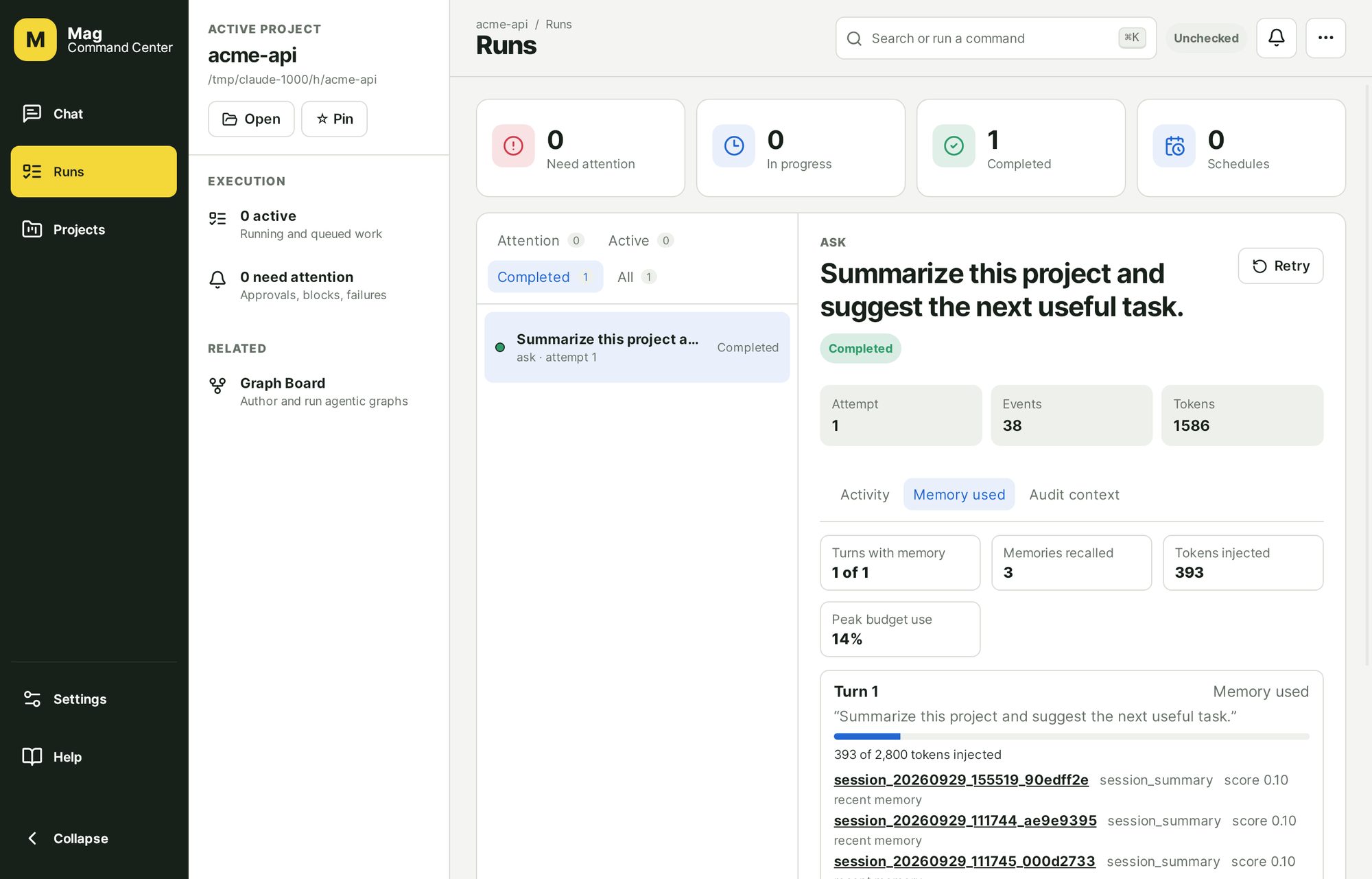
Version 1.4 makes the memory inspectable. Every turn now records which memory nodes were recalled, with scores, the reason each matched, and the tokens injected against the budget; a turn that used no memory records why. /why last explains the previous turn in a terminal session, and the web UI shows a Memory used panel per run. If the argument for memory is that it compounds, the least it owes you is a receipt for what it put in front of the model.
Team memory arrives in the same release: nodes are shared through a Git repository, but only as proposals that pass automatic checks and are accepted by someone other than the author, with every decision appended to a review log. "Always allow" approval grants now expire after 30 days by default and can be listed and revoked, and approvals use the same AAIS 0.2 file store as Loro. One behavior change is worth knowing: under a profile's shell: ask, every shell command now asks, in every permission mode. Plugin packs can be signed and verified against a local trust store, and an offline mock provider covers first-run demos and CI. The mock provider, a remote JSON-RPC gateway (magent serve --rpc), and graph nodes run by MCP tools or A2A agents are labeled experimental.
Versions 1.2 and 1.3 set this up: 1.2 moved the bundled WebMCP bridge to an explicit allowlist of exact HTTPS origins, and 1.3 let an approval decided in one client wake the process that asked for it in another. A self-review of everything new in 1.4 found and fixed issues across the gateway, team memory, plugin signing, graph executors, and grants, each with a regression test; it is a self-review, not an independent audit.
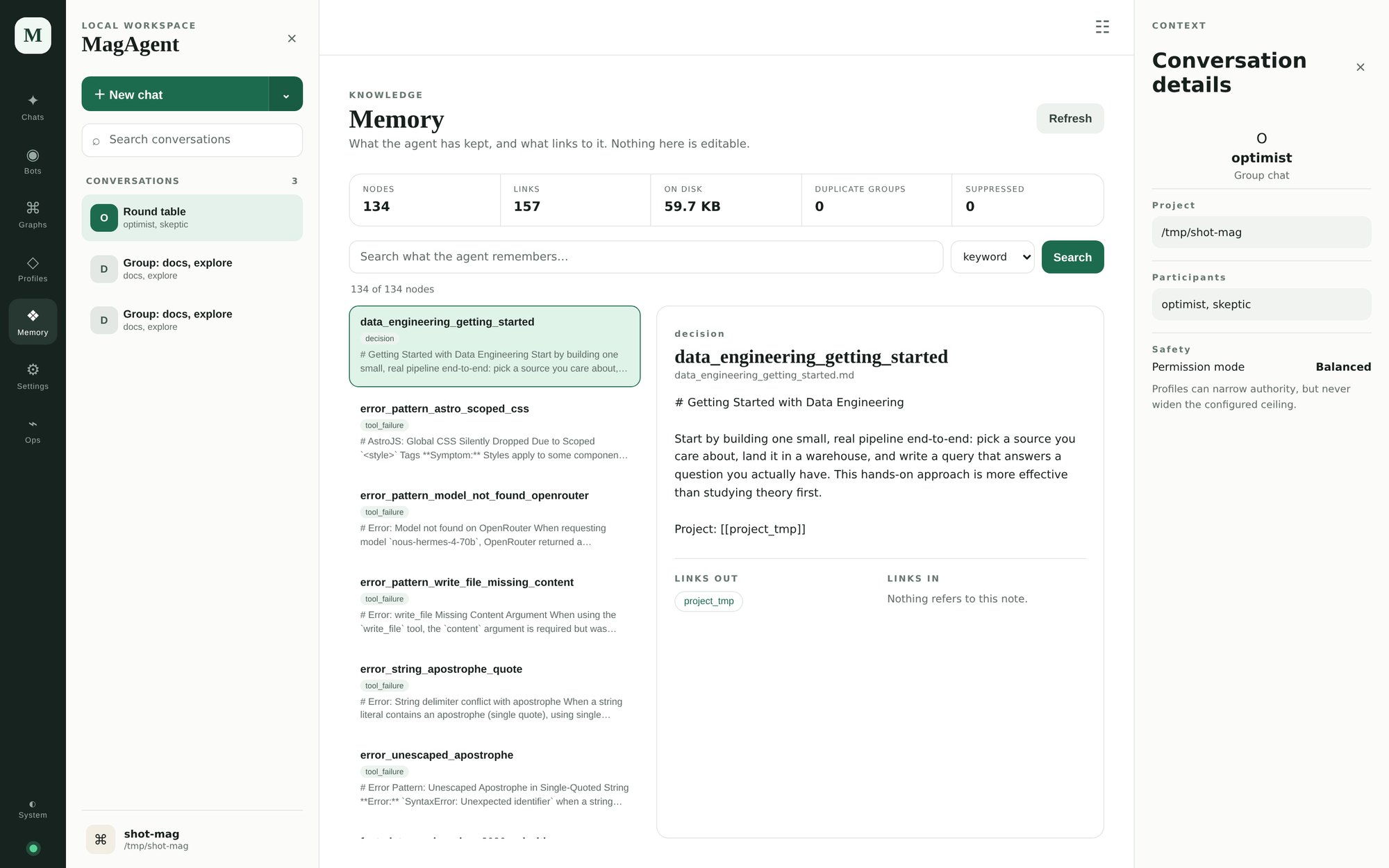
magent ui, run with the offline mock provider against a small demo project. The Memory used panel is the receipt for one run: which memories were recalled, how well they matched, and what they cost in context.Mag Command Center 1.0.0 is the desktop cockpit for MagAgent: runs, approvals, graphs, and memory in one window, on Linux, macOS, and Windows. It is the first stable release after a series of release candidates, built with Tauri, React, and TypeScript, and it requires MagAgent 1.4.0. A new user can create a local profile and then save a provider key or start an offline demo without opening a terminal. The navigation is now three sections, Chat, Runs, and Projects, with project tools and the library in context. Stop ends the whole process tree a run started, including test runners and dev servers, and an approval left pending when a run exits is reported as interrupted instead of silently dropped. A tray icon and OS notifications report waiting approvals and finished runs, Git and checkpoint diffs render as a review with a handoff to your editor, and a Memory used panel shows what MagAgent recalled for each run.
The release also hardened the boundary between the interface and the machine: the workspace console no longer runs arbitrary programs without a native confirmation, Git no longer runs programs configured in a project's .git/config, and extensions must declare the native commands they use. Group sessions, the extension API, a remote mode against MagAgent's gateway, Loro as a second harness, and a managed MagAgent install are included and labeled experimental. The installers are unsigned, because no code-signing certificates are configured yet, so macOS and Windows warn on first launch; each release publishes checksums, software bills of materials, and build-provenance attestations to check against.
How to use it
Install the agent, run the configuration wizard, and work in a project directory. Memory accumulates as you go, and it accumulates as files you can open. To look around before choosing a provider, the offline mock provider answers with labeled canned replies and needs no key.
python -m pip install mag-agent
magent ask "hello" --provider mock   # offline demo, no key, no model call
magent configure
magent                       # interactive session in the current project
magent ui                    # the same project in a loopback browser workspace
magent memory evidence       # which memories the last run recalled, and why
magent recipe run release-prep
magent graph generate "ship the next API version" --out release.agraph.yaml
MagGraph is useful on its own if you only want the memory layer. Point any agent framework at its MCP server, or import it in Python and query recall bundles, backlinks, and traversals directly.
Why it matters
Most agent memory is an opaque store you cannot inspect and cannot move. Storing it as Markdown in Git means memory is diffable, reviewable in a pull request, correctable by hand, and portable to any tool that reads text. When an agent remembers something wrong about your codebase, you fix a file instead of filing a bug.
The Agentic Graph Specification
AGS 1.0 is an open, implementation-neutral format for decomposing a project into a graph of agentic loops. Repository release 1.0.4 now provides support libraries for Python, TypeScript, Go, Rust, and Java; the document format remains AGS 1.0. It is a draft standard, Apache-2.0 for the code and schemas, CC BY 4.0 for the specification text.
What it is
An Agentic Graph is a directed acyclic graph. Every node is one bounded agentic loop, a unit of work an agent runs end to end. Every edge is a control-flow dependency. A node is not a prompt and not a function call. It carries:
- A precise brief, written so an agent that has seen nothing else can act on it.
- Typed inputs and outputs, so data flow is declared separately from control flow.
- Success criteria the harness evaluates rather than the model asserts. Kinds include
command,file_exists,json_schema,regex,expression,llm_judge, andhuman. - An intelligence tier from
minimaltofrontier, a normalized capability demand that describes the task without naming any model or vendor. - Tools, permissions, and budgets, the ceiling on what a node may do and what it may spend.
- Failure handling: retries with feedback, fallbacks, escalation, and human gates.
Node types cover tasks, decisions, human gates, bounded loops, bounded fan-out maps, and subgraphs. Every loop has a max_iterations and every fan-out has a max_items, so there is no way to write an unbounded document. JSON and YAML are the same data model, and a YAML file that does not survive a lossless round trip through JSON is not a valid AGS document.
How to use it
If you are planning work: author a graph by hand, or have an agent generate one, then read it before anything runs. A node is a few lines.
ags_version: "1.0"
kind: AgenticGraph
id: myorg/add-healthcheck
title: Add a health check endpoint
objective: Expose GET /healthz returning service and dependency status.

entrypoints: [implement]

nodes:
  implement:
    title: Implement /healthz
    description: >
      Add a GET /healthz endpoint returning 200 with {"status":"ok"} when the
      database and cache are both reachable, and 503 with per-dependency detail
      when either is not.
    intelligence:
      tier: standard
    requirements:
      tools: [file_read, file_write, shell_exec]
      permissions: [fs:read:**, fs:write:src/**, shell:exec:pytest*]
    success:
      summary: The endpoint exists and behaves as specified under test.
      criteria:
        - id: tests_pass
          kind: command
          description: The health-check tests pass.
          run: pytest tests/test_healthz.py -q
Validate it against the reference implementation, then hand it to any conformant harness:
python3 -m pip install agentic-graph-spec
ags-validate path/to/graph.agraph.yaml
ags-validate --strict examples/
If you build harnesses: the repository has a JSON Schema for graph documents and another for run records, five worked examples, invalid fixtures that each name the diagnostic they should produce, and an integration guide covering parsing, scheduling, model routing, criteria evaluation, and human checkpoints. Release 1.0.4 extends that same conformance corpus across Python, TypeScript, Go, Rust, and Java, including strict parsing, RFC 8785 graph identities, deterministic Level 0 planning, and executable validation CLIs. You pick a conformance level and reject graphs that need more, rather than silently ignoring what you cannot do.
- 0Reader. Parse, validate, resolve dependencies, render a plan. No execution.
- 1Minimal harness. Tasks and gates, sequence edges, retries, the basic criteria kinds, tier routing.
- 2Standard harness. Decisions, conditional edges, the full expression language, budget enforcement, real parallelism, escalation.
- 3Full harness. Loops, maps, subgraphs, judged and external criteria, compensation, run records, checkpoint and resume.
Why it matters
When the decomposition lives inside a harness, four things follow. You cannot review the plan before the tokens are spent. You cannot move it to another tool. Completion is whatever the model claims it is. And every task gets the same model, which either overspends on trivia or underspends on the one architectural decision that mattered.
Making the plan a file fixes all four at once. It becomes reviewable in a pull request, diffable across revisions, portable between harnesses, and checkable against criteria a machine can run. The tier field is the quiet win: a graph states how hard each piece of work is, and the harness maps tiers to models through its own routing profile, so a plan written today still routes correctly when next year's models arrive.
Open Agent Profile
OAP 1.0 is a draft specification for persisting a named AI agent as data instead of keeping a process alive. Repository release 1.0.5 provides support libraries for Python, TypeScript, Go, Rust, and Java; the document format remains OAP 1.0.
What it is
An Open Agent Profile is a file that describes an agent's durable identity: role instructions, model preference, tool surface, permissions, attached context, memory stores, learned state, and revision history. A harness reads the profile to start a fresh session on demand, and a session emits an AgentStateDelta when it ends.
The important boundary is security, not syntax. A profile can narrow authority, never widen it. Learned state is treated as untrusted context, not as new system instructions. And an agent can propose changes to its own contract, but the harness or a human decides whether those changes are written back.
python3 -m pip install open-agent-profile
oap-validate profile.agent.yaml --digest
The support suite carries the same safety model across five languages: schema and security validation, RFC 8785 digests, inheritance, authority narrowing, prompt rendering, atomic state deltas, retention behavior, safe persistence, and command-line validation. Shared fixtures keep equivalent profiles and digests interoperable rather than merely similar.
How it maps to the stack
- MagAgent already has Markdown agent definitions with frontmatter, which map naturally to OAP's Markdown encoding. OAP adds state, history, deltas, and writeback discipline.
- MagGraph remains the volume memory layer. OAP profiles can reference it as a memory store while keeping bounded identity and learned state in the profile.
- Loro 0.22.0 claims OAP Level 3 harness behavior: profile composition, scoped MCP and Skills, subagent delegation, profile-selected memory stores, and AGS nodes bound to named profiles. Its Web UI edits the same profiles under the same policy. Loro, MagAgent, and Merced AI now compute profile digests the same way as the reference library, so a digest means the same thing in all three.
- Merced AI treats an OAP profile as the unit that travels. It projects one profile onto whichever installed harness you point it at and reports whether that harness received it natively, through a compatibility projection, in degraded form, or not at all.
- AGS describes the job. OAP describes the agent selected for that job. Together they let a graph node say not only what work needs doing, but which durable agent profile should do it.
Why it matters
Without a profile format, useful agents either vanish with the session or become proprietary configuration trapped inside one harness. OAP makes the agent itself reviewable, diffable, portable, and safe to evolve. The file is the agent's identity; the running session is just one temporary materialization of it.
The Agent Approval Interchange Specification
AAIS 1.0 is a transport-neutral contract for asking a human to authorize one exact agent action. Support libraries are published for five languages: Python at 0.2.0, and TypeScript, Go, Rust, and Java at 0.1.0, because each language library is versioned independently.
What it is
AAIS turns a blocking terminal prompt into durable application state. A harness can pause a chat, bot, subagent, background task, or graph node and publish a request that a CLI, web UI, desktop app, or policy service can present. The harness remains authoritative and revalidates the returned decision before acting.
- Exact-action binding through RFC 8785 canonical JSON and a SHA-256 digest.
- Bounded scopes: the client can choose only once, session, or constrained persistent authority that the harness explicitly offered.
- Fail-closed lifecycle for stale, expired, conflicting, malformed, or replayed decisions.
- Reconnectable state through ordered events and durable snapshots.
- No private thought trace: concise activity, provenance, risk, choices, decisions, and receipts are enough.
How it composes
AGS says what work exists and where a gate belongs. OAP says who the agent is and the ceiling on its authority. AAIS carries the live request and human decision when a particular action reaches that boundary. MCP, AG-UI, HTTP/SSE, WebSocket, or stdio can transport the messages without replacing the contract.
A shared store for Python harnesses
Python library 0.2.0 adds aais.store.FileApprovalStore, a durable approval authority that several processes can share through one JSON file: a web server, a CLI, a background worker, and a stdio bridge can all wait on and resolve the same requests. It holds a lock for the whole transaction, writes atomically, quarantines a corrupt file instead of reading it as empty, and records each pending request's owner as process id, process start time, and host, so a reused process id cannot make a stopped owner look alive. The specification, schema, and conformance corpus did not change.
Loro 0.22 and MagAgent 1.4 now keep their approvals in this store instead of in their own file handling, and Merced AI 0.8 uses the library's owner-identity checks for its approval presenter.
Loro
Loro 0.22.0 is the governed agent harness for data and platform teams: verified identity, tamper-evident audit, lakehouse-native tools. It runs from a Python CLI and a local web UI, with AGS graphs, OAP profiles, and durable AAIS approvals.
What it is
Loro is the same general harness idea as MagAgent pointed at a different problem. A developer harness optimizes for speed in one person's terminal. An enterprise harness has to answer questions afterward: who ran this, under whose identity, with whose approval, against which policy, and what did it touch.
- Identity context resolved from configuration and environment, with managed required fields propagated into audit and session records.
- Identity-bound approvals with once, session, and deny prompts, plus replay protection.
- Permission policy over normalized filesystem, shell, Git, memory, catalog, provider, and MCP resources, with
loro policy explainto show why a decision was made. - Subprocess sandbox profiles with minimized environments, bounded runtime and output, and optional Bubblewrap enforcement.
- Runtime budgets covering model bytes, tokens, cost, and tool calls.
- A hash-chained audit log: versioned JSONL with process locking and a SHA-256 chain, an authenticated HTTP sink, bounded buffering with retry, and
audit doctor,flush, andverifycommands. - Governed memory, local and shared, with Postgres and Apache Iceberg adapters where shared writes are explicit-only and draft-gated, plus read-only Apache Polaris catalog discovery.
- Layered configuration from system, user, project, local, and runtime sources, with enterprise-managed overlays that can be required and pinned by SHA-256.
It also generates artifacts, Markdown and DOCX documents, PPTX decks, and XLSX or CSV spreadsheets, each with a provenance sidecar recording the prompt preview, generated paths, assumptions, and generator metadata. It speaks MCP as a client and can serve a least-privilege read-only subset as a server.
Since 0.12.0 the harness has grown three things worth calling out. Channel gateways now cover Slack, Discord, Telegram, Teams, Signal bridges, and generic signed webhooks, with platform users mapped to tenant-scoped Loro identities and remote message text explicitly carrying no approval authority. A credential vault keeps provider and gateway secrets in the operating-system keyring, including multiple named accounts for the same provider. And loro get-started reads the current folder's provider, model, profile, workspace, memory, MCP, sandbox, and audit readiness, then recommends the next command.
The 0.16.1 release completed that loopback-first React Web UI over the same governed runtime. The parts that make Loro Loro are now in the browser: Agentic Graphs run through the same governed executor and hold human gates for an explicit decision; a read-only Governance view shows resolved identity, budgets, sandbox posture, what policy would decide for a hypothetical request, and the audit record with its hash chain verified; and Memory exposes local notes, governed shared memory, and the proposal queue, where a proposal can now be declined rather than only accepted. A chat reply and a graph run each outlive the page watching them, resuming from a cursor after a reload. Nothing about it is a second policy path: the browser sees what the CLI would allow, and no more.
Version 0.19.2 added durable AAIS requests so approvals raised by chats, bots, and graph nodes appear in the web UI and survive reconnects. Version 0.20 made WebMCP a governed capability, discovering tools only from an explicit allowlist of exact HTTPS origins, and 0.21 let an approval decided in one local client wake the run that asked for it in another, plus a graph recovery report that shows which nodes completed, which are waiting, and which have uncertain effects.
Current release: 0.22.0. It adds a lot at once, and the honest way to describe it is to separate what is supported from what is experimental. Supported: resumed sessions and web conversations send earlier turns to the model as real messages, and when history outgrows its budget the oldest turns are compacted into a deterministic summary, without a model call, with the compaction written to the audit log. Approvals move to the AAIS 0.2 file store, profile digests now match the reference library, and a graph node that names an executor Loro does not implement is refused instead of quietly running as an ordinary task. The local web UI in its loopback, single-user mode and Loro's MCP server at protocol revision 2025-11-25 are promoted to supported.
Experimental: OpenID Connect sign-in, where Loro verifies tokens itself and marks an identity as verified only when a token passed those checks (tested against a mock identity provider, not a public one); a multi-user mode with role-based access and a Postgres approval authority; a Docker or Podman container sandbox; command hooks and plugins; OpenTelemetry traces with audit forwarding to a SIEM; and per-run evidence bundles. The evidence bundle is the one I would point at: loro run export puts one run's hash-verified audit slice, approval receipts, configuration and profile digests, and tool calls into one archive, and loro run verify fails if any byte was altered. The release's threat model review found and fixed eleven issues, each with a regression test; it is a self-review by the engineer who built the features, not a penetration test.
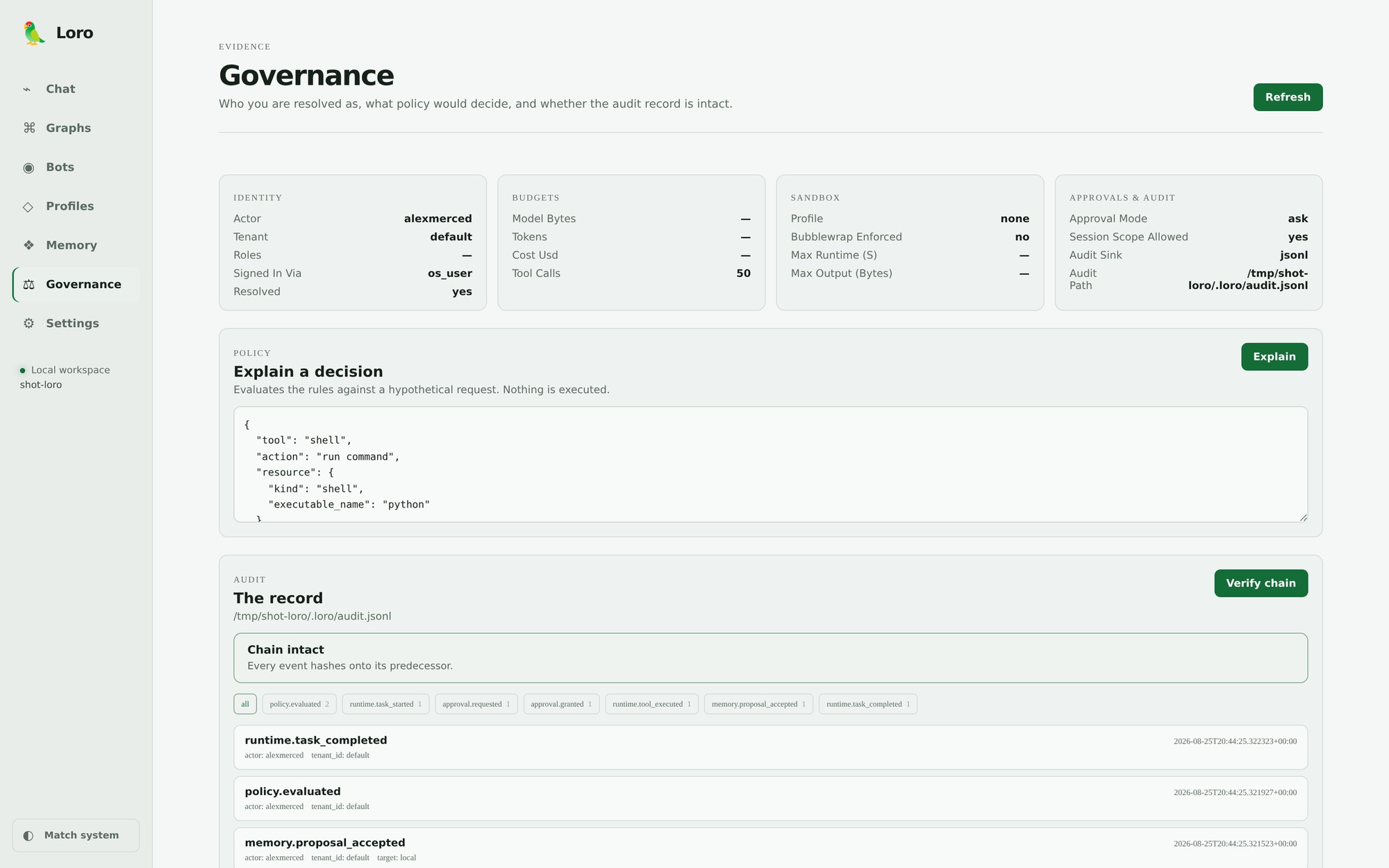
loro web, after one run with the offline mock provider. The Governance view: what policy would decide for a hypothetical request, and the audit record with its hash chain verified. Read-only throughout, so nothing here can grant authority.How to use it
Install, configure a provider, then run the setup wizards for the governance pieces your organization needs. There is a mock provider so a first run needs no API key at all.
python -m pip install loro-agent
loro configure
loro get-started
loro doctor

loro setup identity
loro setup approvals
loro setup sandbox
loro setup audit

loro run "Inspect README.md and suggest the next three improvements."
loro audit verify

python -m pip install "loro-agent[webui]"
loro web                     # the same governed runtime, in a loopback browser
For work that needs explicit scheduling and approval, go through a graph instead of a single prompt. Loro implements AGS at conformance level 3, including durable resume, model-tier routing, harness-evaluated criteria, gates, branches, bounded loops and maps, subgraphs, parallel execution, fallbacks, and compensation. When a graph node names an OAP profile, Loro intersects the graph, profile, identity, and managed policy before it runs anything.
loro run export <run-id> --out run.zip   # experimental evidence bundle for one run
loro run verify run.zip

loro graph generate "Create a release readiness report" --out release.agraph.yaml
loro graph validate release.agraph.yaml --strict
loro graph plan release.agraph.yaml
loro graph run release.agraph.yaml --dry-run
Why it matters
Agentic coding stalls in regulated environments for a reason that has nothing to do with model quality. The blocker is evidence. A team can rarely say which identity authorized a write, what the policy was at that moment, or prove the record has not been edited since. Loro is built so those answers exist by default rather than being reconstructed later.
Worth saying plainly: shipping this in a portable, provable form is what the project covers. Identity-provider integration, production sandbox validation, retention, destination immutability, and an approved external-checker registry are deployment concerns that belong to the adopting organization. The repository documents that boundary instead of implying the box is checked.
Merced AI
Merced AI 0.8.0 carries one portable agent identity across the harnesses you already use, with honest reports of what each one drops. It is a local-first broker, and deliberately not another agent loop.
What it is
Most developers now have four or five agent CLIs on one machine, each authenticated separately, each with its own idea of what an agent is. Merced AI discovers those executables safely, normalizes their noninteractive interfaces, and uses Open Agent Profile documents to turn them into named bots you can chat and collaborate with. The profile is the portable part. The harness stays in charge.
That boundary is the whole design. The selected harness keeps model access, tools, authentication, sandboxing, approvals, and final policy enforcement. Merced AI never supersedes a harness policy, and it never pretends to. Fourteen harnesses are discovered and executable today, including Codex, Claude Code, Gemini CLI, OpenCode, Goose, Anton, DSH, Antigravity CLI, Pi, Prime Agent, OpenClaw, Kimi Code CLI, and both of the harnesses on this page.
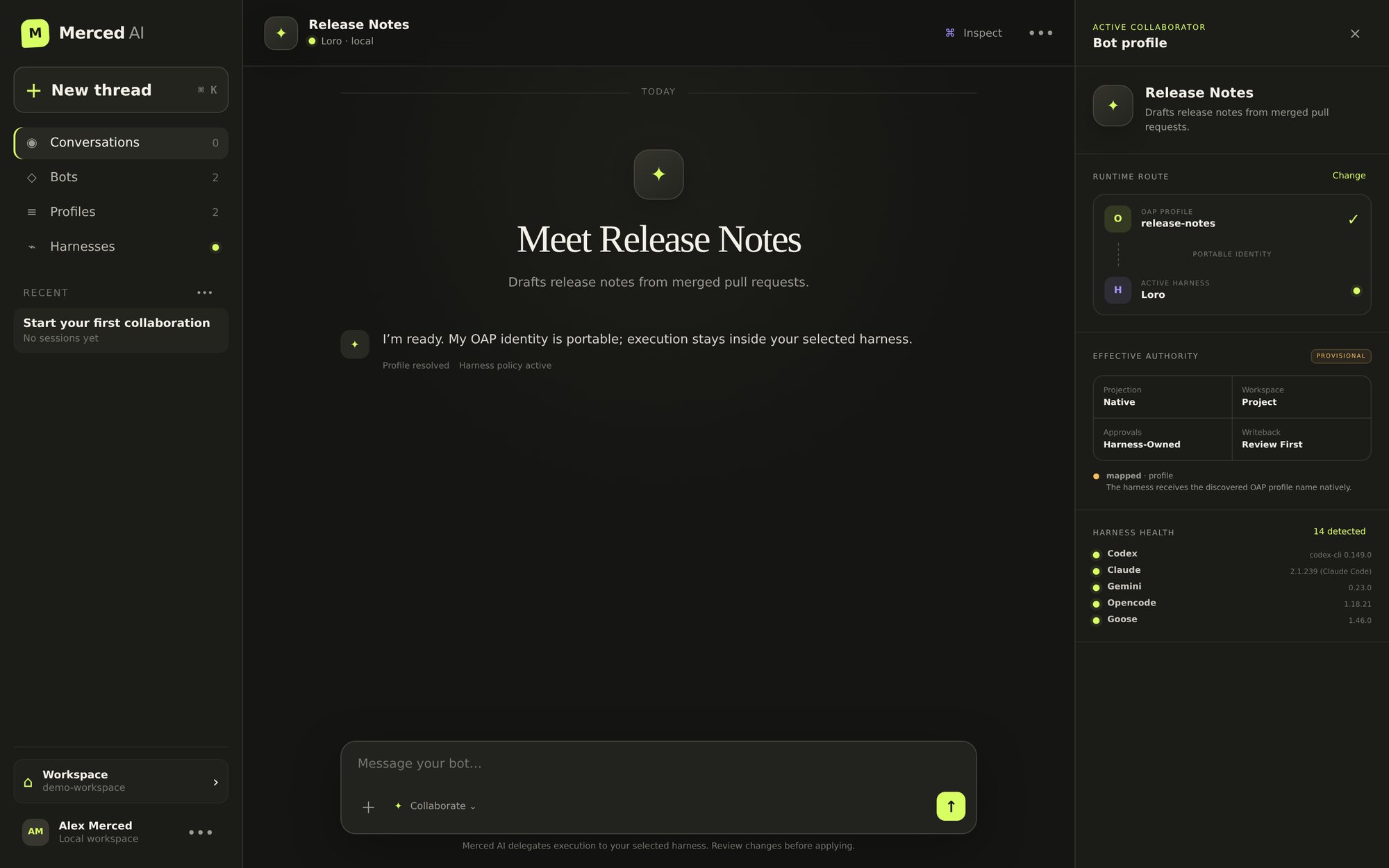
merced-ai ui. A group conversation across two harnesses, Loro and MagAgent, both on their offline mock providers. Each bot keeps its own profile, route, and approval boundary, and each reply says which harness produced it.How to use it
Initialize a workspace, write a profile, bind it to a harness with a fallback, and review the exact projection before a single token is spent.
python -m pip install merced-ai
merced-ai init
merced-ai harness list

merced-ai profile create reviewer \
  --description "Reviews code for concrete defects before merge." \
  --instructions "Review code. Report verified defects and do not edit files."

merced-ai bot create reviewer --profile reviewer --harness codex --fallback claude

merced-ai ask reviewer "Review the current diff" --dry-run --explain
merced-ai profile effective reviewer --harness codex
Then run it, chat with it, or open the same records in a browser. Sessions are durable, atomic, and project-local, so a conversation survives a restart and can be resumed by id.
Since 0.2.0 a conversation can hold several bots at once. Group chats work across the CLI, the API and the web UI, with exact mentions, ask-everyone, named-recipient and round-robin dispatch. Participants run concurrently but persist in a deterministic order, each reply is attributed to the bot that produced it, one failing bot does not take the round down, and a retry targets only that bot.
Version 0.5 added durable, approval-aware sessions, 0.6 made WebMCP a routing requirement so a bot that needs browser-native tools fails over past harnesses that cannot provide them, and 0.7 made runs belong to the broker, with reconnect by run id and cancellation that ends the whole process group. Merced AI still claims OAP Level 1 as a broker and reads AGS graphs at Level 0.
Version 0.8.0 is where the broker learned to speak more of the protocols harnesses already speak, without growing a loop of its own. Claude Code, Gemini CLI, Goose, and OpenCode run over the Agent Client Protocol when their launchers are installed, with permission requests going through the AAIS approval dialog or a terminal prompt; in the other direction, merced-ai acp serves a bot or a room to editors such as Zed. In a group conversation, each write-capable bot can get its own Git worktree, so bots work concurrently without touching your files, and you apply one bot's patch only if it applies cleanly. Cross-harness evals send one profile and prompt to several harnesses and score deterministic checks first, with an optional judge's opinion reported separately. The projection report now lists every profile section a harness drops, and each harness descriptor separates what the harness supports from what the broker actually implements for it. When MagAgent, Loro, or an ACP agent asks for approval during a command-line run, Merced AI shows the exact request and takes one key, with Deny as the default. An A2A endpoint on the UI server is experimental, and a security self-review of the new surfaces, not an independent audit, led to fixes around worktree paths, symbolic links in patches, plugin loading, and DNS rebinding.
merced-ai ask reviewer "Review the current diff"
merced-ai chat reviewer
merced-ai session list
merced-ai session resume <session-id>
merced-ai eval run -p reviewer --prompt "Review the current diff" -H claude -H codex

python -m pip install 'merced-ai[webui]'
merced-ai ui                 # loopback web UI, now on port 8773 by default
Why it matters
The honest part is the projection report. When a harness receives the OAP profile through its own CLI, that is native. When the profile has to be rendered into a system prompt or a delimited prompt block, that is projected or degraded, and Merced AI says so rather than implying the identity carried over intact. Nothing here can make a harness enforce a permission it does not have.
The payoff is that a reviewed agent stops being a per-tool configuration. You write the profile once, keep it in the repository next to the code, and run it wherever the work is, without rewriting it for each vendor's format or waiting for one harness to win.
How the pieces fit
AGS is the job contract. OAP is the agent contract. AAIS is the live human-authorization contract. Everything else is an implementation choice.
-
01
AGS is the work interchange format
A graph is a file. It can be written by a person, generated by an agent, reviewed in a pull request, and stored next to the code it describes. Nothing in the normative model names a vendor, a model, or a runtime.
-
02
OAP is the durable agent profile
A profile is also a file. It records who the agent is, what tools and permissions it asks for, what memory it may use, and what it learned. Sessions propose deltas; the harness decides what persists.
-
03
AAIS carries exact approval decisions
A pending decision survives navigation and reconnect. The interface presents it; the harness verifies its action digest, scope, expiry, and policy before continuing.
-
04
MagAgent and Loro are harnesses that adopt it
Both implement AGS conformance level 3 and surface AAIS decisions in their UIs. MagAgent 1.4.0 is the memory-first personal agent; Loro 0.22.0 is the governed harness for data and platform teams.
-
05
Merced AI carries a profile to the harnesses you already run
You should not have to adopt my harness to use the formats. Merced AI 0.8.0 discovers installed agent CLIs, binds one OAP profile to any of them, and reports plainly which profile sections each one drops.
-
06
MagGraph is the memory underneath
A graph describes one job. MagGraph holds what accumulates across jobs: project conventions, past decisions, the shape of a codebase. Markdown nodes in Git, so the memory is reviewable the same way the plan is.
-
07
Nothing here requires the rest of it
Implement AGS, OAP, or AAIS in your own harness and never touch Mag or Loro. Use MagGraph under a different framework or point Merced AI at a stack containing none of my tools. The formats are designed to keep the pieces separable.
Building a harness Implementation reports are the most useful contribution to the specs right now. If AGS, OAP, or AAIS makes something awkward to express safely, that is a spec issue worth filing.
Common Questions
What is the Agentic Graph Specification?
AGS is an open format for writing down how a project is decomposed into agentic work. A graph is a directed acyclic graph whose nodes are bounded agentic loops. Each node carries a brief, typed inputs and outputs, success criteria the harness evaluates, an intelligence tier, the tools and permissions it may use, and budgets. It serializes to JSON or YAML and any conformant harness can run it.
What is the Open Agent Profile specification?
OAP is a draft 1.0 specification for persisting a named AI agent as a file instead of a running process. A profile captures the agent's role, model, tools, permissions, context, memory stores, learned state, and revision history. A harness reads it to instantiate a session and writes back only through controlled state deltas.
Why write the plan down instead of letting the agent plan internally?
A plan that lives only inside a harness cannot be reviewed before the tokens are spent, cannot move to another tool, and cannot define completion in checkable terms. As a file it becomes reviewable, diffable, portable, and routable, so each node gets a model sized to the work.
What is the difference between MagAgent and Loro?
Both are AGS level 3 harnesses. MagAgent 1.4.0 is the memory-first personal agent, with MagGraph memory it can show receipts for and a browser Graph Kanban. Loro 0.22.0 is the governed harness for data and platform teams, with identity, policy, sandboxes, budgets, hash-chained audit, shared memory, gateways, and OAP Level 3 profiles. Both keep approvals in the same AAIS store and surface them in their UIs.
What is Merced AI, and does it replace them?
No, it sits a step above them. Merced AI is a local-first broker: it discovers the 14 agent harnesses that may already be installed on your machine, normalizes their noninteractive interfaces, and binds OAP profiles to them as named bots. It is not another agent loop. The selected harness keeps model access, tools, authentication, sandboxing, approvals, and final policy enforcement, and Merced AI reports honestly whether your profile landed natively, as a projection, degraded, or not at all.
Do I have to use all of them?
No. AGS and OAP are implementation-neutral by design, MagGraph works under any agent framework through its Python API or MCP server, either harness is useful on its own, and Merced AI is useful even if you run none of my harnesses. They are built to compose, not to lock together.
Are AGS and OAP stable enough to build on?
AGS 1.0 is a draft standard and OAP 1.0 is a draft specification. Both have schemas, examples, and conformance rules, and both are intended to evolve through additive 1.x releases. The honest caveat: independent implementation and formal certification are still early.
How do I follow the work?
Everything is public on GitHub, with Loro under alexmerced-oss. Issues and pull requests are open on every repository, and the fastest way to reach me about any of it is contact@alexmerced.com.
Pick a starting point
Read the spec, install an agent, or go back to the rest of what I build.
Read the spec
Start with AGS for graph-shaped work and OAP for persistent named agents.
Try an agent
MagAgent for a developer terminal, Loro when the work needs identity, approvals, and an audit trail, Merced AI when you would rather keep the harness you already use.
See the rest
The lakehouse tooling, the books, and everything else on the main page.